The family organizer
A little more together.
Ourstead is one calm place for your family’s calendar, chores, meals, shopping and home, so everyone knows what is happening today and who is doing what.
Free for your household. Works in the browser on a phone, tablet or computer.
What it does
Everything the family juggles, in one place
No more three apps and a fridge door. Each part of Ourstead knows about the others, so dinner turns into a shopping list and a practice turns into a ride.
-
Today
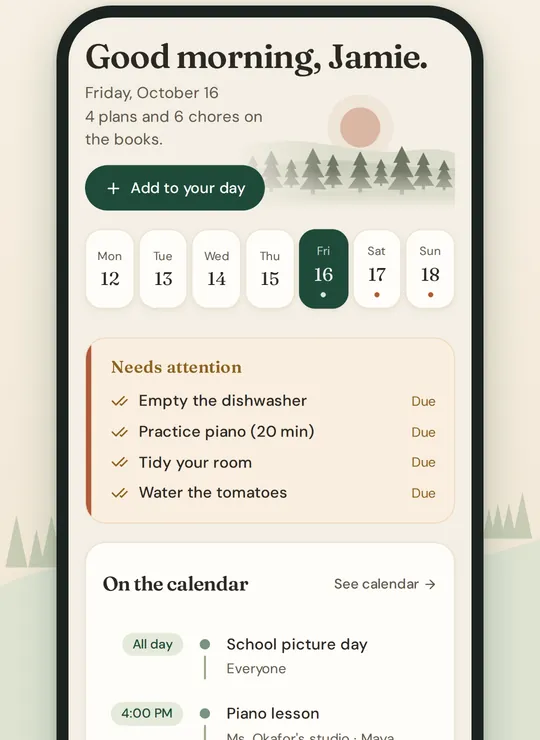
The family’s day on one screen: what is on, the chores still to do, tonight’s dinner and what to pick up.
-
One family calendar
Practices, appointments and birthdays together. Bring in a Google or Outlook calendar, and see who is driving.
-
Chores and routines
Assign chores, make them repeat, and approve them when a grown-up’s nod is needed. Routines go one step at a time.
-
Meals and recipes
Keep your recipes, add one from a web page, plan the week, and send the ingredients to your list.
-
Shopping
Shared lists everyone can add to, grouped by aisle and up to date on every phone.
-
The kitchen wall
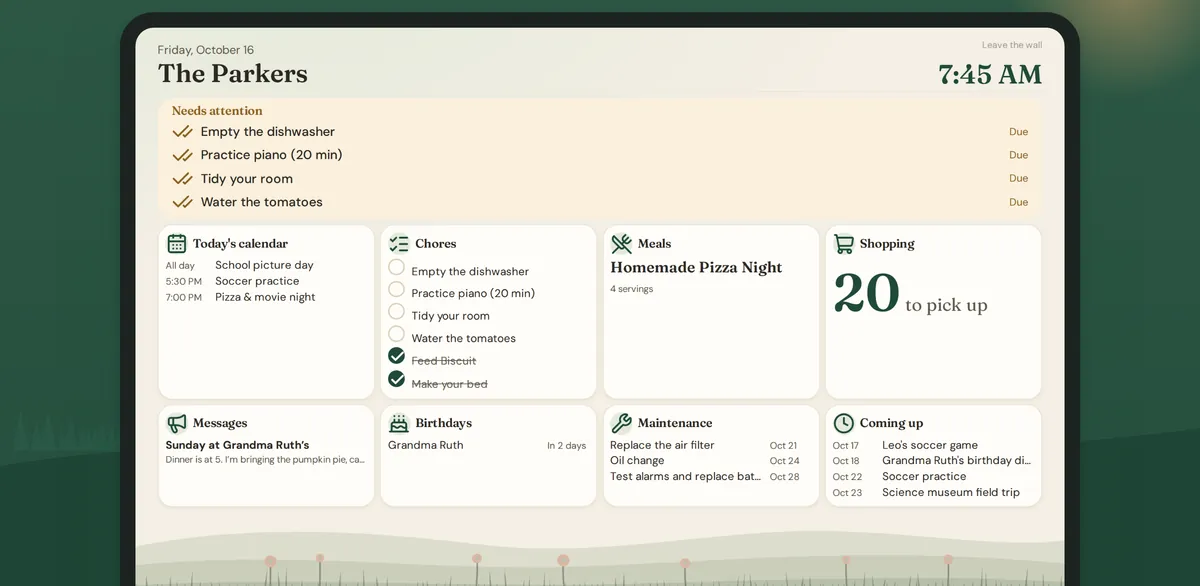
A tablet on the wall shows the day, the chores and dinner to everyone walking past.
-
Messages and notes
Family announcements, private chats and stickers, plus notes and checklists.
-
People and birthdays
Birthdays, gift ideas and the people you keep close, with a reminder before the day.
-
Home and inventory
Filters, smoke alarms and oil changes, with reminders when they are due, and where everything is kept.
-
Sitter pass
Give a babysitter one link with what they need for the evening, and end it when you are home. Not in the beta yet.
-
Living Drawings
A child’s drawing becomes a character that moves on the family’s screens. Not in the beta yet.
-
Documents and money
Paperwork, a budget and net worth, with bank connections and home values on Plus. Not in the beta yet.
How it works
Set up in an evening
Create your household
Give it a name and you become its owner. It takes a minute. How to start
Bring in the family
Invite your partner by email. Add the children yourself: they never need an email address. Inviting a grown-up
Add what is coming up
Events, chores, dinners and the shopping list. Everyone sees the same plan on their own phone, and the wall shows it to the whole kitchen. Your Today screen
On the wall
The whole family, at a glance
Turn a tablet into a kitchen display. It shows the date and time, what needs attention, today’s calendar, chores, dinner, the shopping list, messages, birthdays and what is coming up, large enough to read from across the room.
Private by design
Your family’s information stays yours
- What you enter is used only to run Ourstead for your household. It is never sold and never used for advertising.
- Grown-ups decide what each child can see, and private events stay private.
- Children are added by a parent and never need an email address.
- Two-step sign-in and passkeys add a second lock to your account.
- You can delete your account from Settings at any time.
Made by a small company you can write to
Ourstead is made by Wright Labs LLC in Kentucky. Email support@ourstead.casa and a person reads every message.
Plans
Free for your household. Plus when you want help.
Free
$0
The calendar, chores, meals, shopping, messages, notes, the wall display, home maintenance and more, for everyone in your household.
Plus
$10 a month
Or $100 a year, for the whole household. Adds planning help like Plan my week, a warning when a driver is already busy, and a draft plan for the week ahead. Free during the beta.
Questions families ask
Who is Ourstead for?
Families who share a home and a calendar: parents, the children, and anyone else who helps run the house. A grown-up creates the household and invites the others.
What does it run on?
Any up-to-date browser on a phone, tablet or computer. On an iPhone you can add it to your Home Screen so it opens like an app. Apps for Android and iPhone are being tested now. Getting Ourstead on your phone
Do the children need their own phones?
No. A grown-up adds each child to the household, with no email address. Children can see their day on the family’s wall display, and grown-ups can tick off chores for them. Adding your children
Does my partner need to pay too?
No. Plans belong to the household, so everyone in it has the same features on every device.
Can I bring in the calendars we already use?
Yes. Connect a Google or Outlook calendar, or add a calendar’s private link, and its events show alongside the family’s. Connecting a calendar
What does “beta” mean here?
Ourstead is new, and families are using it while we finish it. A few parts are not open yet: the budget, net worth and allowance, documents and Living Drawings. Tell us what you think at support@ourstead.casa.
Bring the family onto one page.
Create your household in a minute, then invite your partner and add the children.